
Design a useful human handoff
Make uncertainty visible and give the next person the context needed to act.
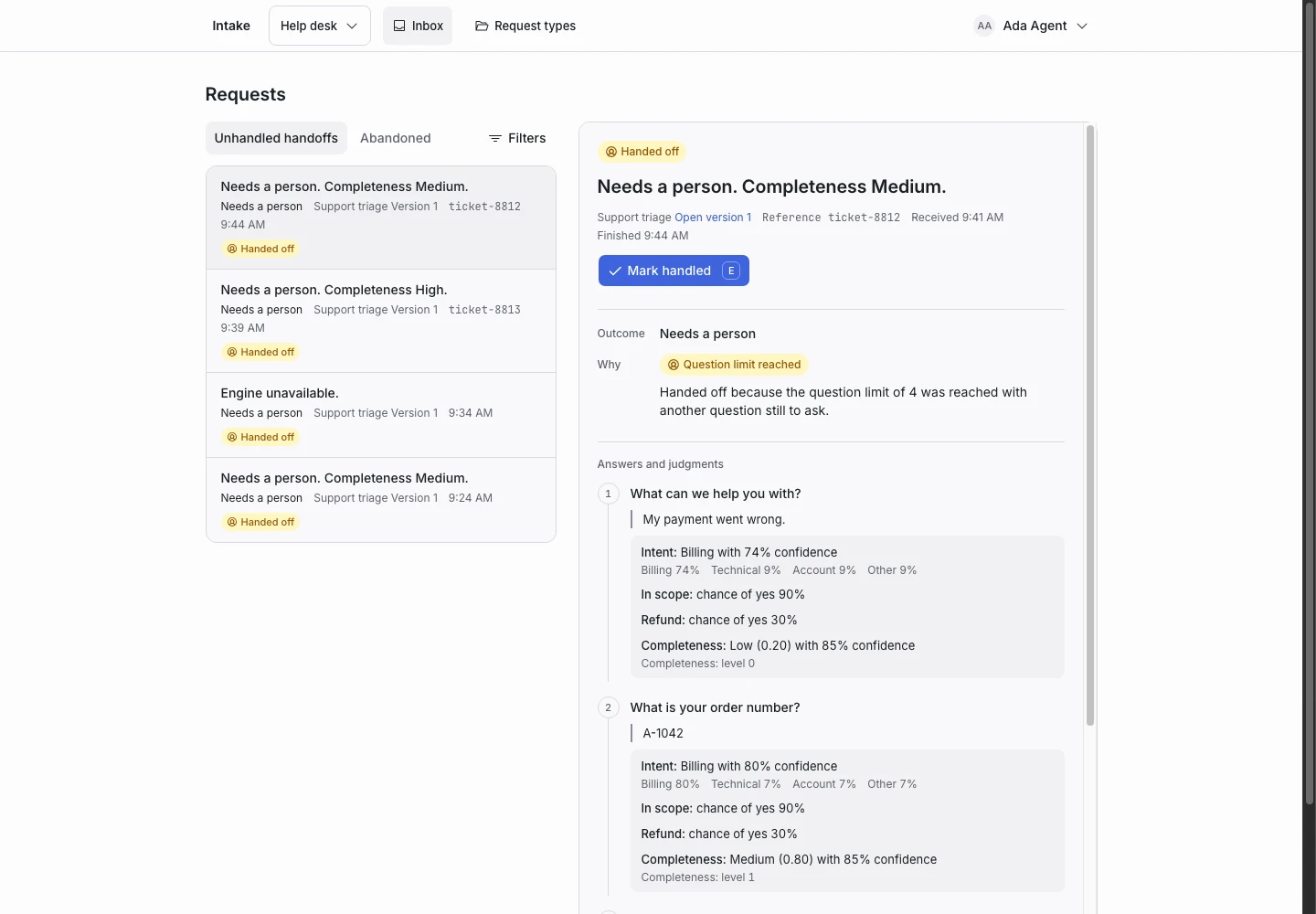
Product screen with sample data. Intake is the previous working name.
Decide when a person must take over
Write down the conditions that require human review. These can include low confidence, a request outside your service, a judging failure, or a reached question limit.
A handoff is an expected outcome. Test it with the same care as a completed request.
Preserve the original request
Keep the applicant’s words available to the agent. A short summary helps with the list view, but the person needs the source text for context.
ClientStack records the judgment for each answer. The request details explain which rule or runtime condition caused the handoff.
Give the inbox a purpose
Use Unhandled handoffs as the starting list. Agents should read the reason, do the work, then mark the request handled.
Handled marking tracks progress. It does not alter the decision or claim that an external system changed.
Learn from the handoffs
If several similar requests need review, a manager can save representative requests as examples. Set the expected outcome and test a draft improvement.
Do not lower a threshold to make a count look better. Check the newly completed requests as well as the reduced handoffs.
Plan the external step
If an agent works in another helpdesk, define when to create a ticket and when to mark the ClientStack request handled. An API integration can automate that exchange through your own code.
The current product does not include native helpdesk connectors. Read the API flow before building the connection.
